
 +91 7044535163



Progressive Web Apps vs Native Apps: The Complete 2026 Business Decision Guide
13th Jul, 2026
16 min read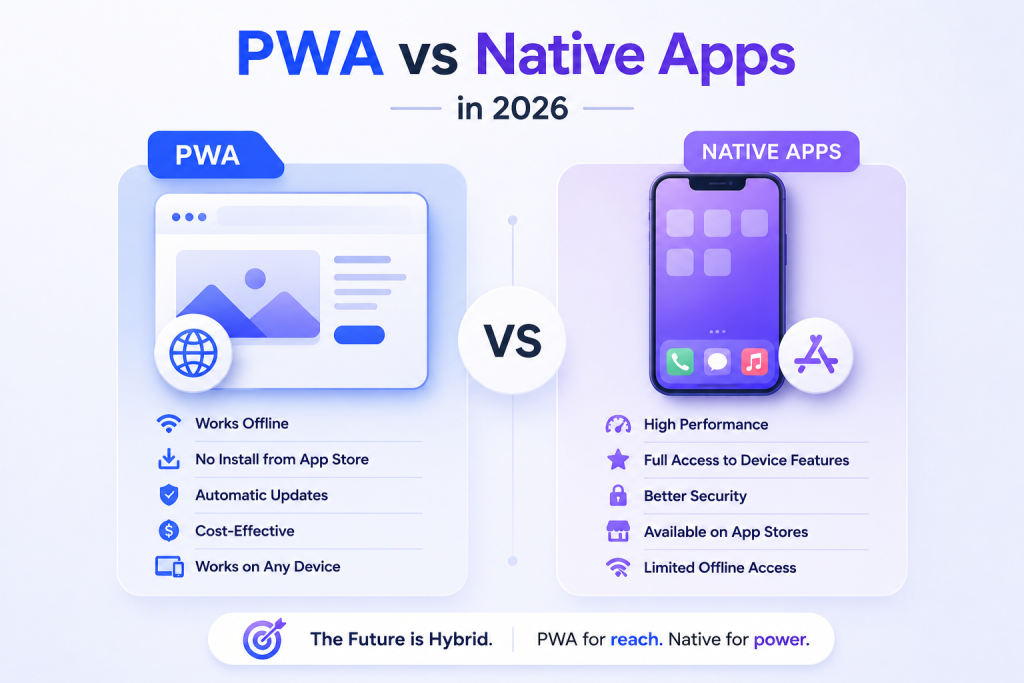
Every business thinking about building a digital product faces the same fork in the road: do we build a Progressive Web App (PWA) or a native mobile app? Get it right and you launch on time, within budget, and with users who actually engage. Get it wrong and you spend six months building something that underserves your audience or blows twice your planned budget.
The good news is that in 2026, this decision is clearer than it has ever been. Both approaches have matured significantly. PWAs have closed most of the capability gap that held them back. Native frameworks like Flutter and React Native have made cross-platform development faster and cheaper. And the real-world performance data from thousands of businesses that have now shipped both tells a consistent story about which type of project belongs in which camp.
This guide cuts through the noise and gives you the full picture what each approach actually is, how they compare across every business-critical dimension, and a straight verdict by business type so you can make the decision with confidence.
What Is a Progressive Web App (PWA)?
A Progressive Web App is a website built with modern web technologies that behaves like a mobile app. It runs in the browser but can be installed on a user’s home screen, work without an internet connection, send push notifications, and access a growing range of device features all without requiring a visit to an app store.
The technology that makes this possible is a combination of service workers, web app manifests, and modern browser APIs. Service workers are background scripts that intercept network requests and manage caching they’re what allows a PWA to load instantly on repeat visits and continue working when connectivity drops. The web app manifest tells the browser how to present the app: its name, icon, theme colour, and display mode.
In 2026, the platform gap that once held PWAs back has largely closed. Apple’s Safari now supports most advanced PWA features that were previously Chrome-only, and every major browser passes the core PWA audit. PWAs can now access the camera, GPS, accelerometer, biometric authentication, background sync, and file system capabilities that required native code just a few years ago.
PWAs can be indexed by search engines, cited by AI tools, and discovered through organic search something native apps can never achieve. In 2026, this SEO advantage is more valuable than ever.
What Is a Native Mobile App?
A native app is built specifically for a mobile operating system. Traditional native development means writing in Swift or Objective-C for iOS and Kotlin or Java for Android two separate codebases, two separate development teams, and roughly double the maintenance overhead.
The more common approach in 2026 is cross-platform native development using Flutter or React Native. Both frameworks compile to native code on iOS and Android from a single codebase, giving you 95%+ of the performance and device access of fully native development at significantly reduced cost and timeline.
Native apps are distributed through the App Store and Google Play. They access the full device API set including Bluetooth, NFC, ARKit/ARCore, HealthKit, and complex camera controls. They use platform-native UI components rendered directly by the operating system, which is the core technical reason they outperform PWAs in graphics-intensive and hardware-dependent scenarios.
One reality worth naming upfront: there are over 5 million apps across the App Store and Google Play combined. Getting discovered in that environment without significant marketing investment is genuinely difficult which changes the calculus on whether app store distribution is actually an advantage for your specific project.
Comparison by Business Criteria The Full Picture
| Progressive Web App (PWA) | Native App | |
|---|---|---|
| Cost | $15K–$90K (simple to medium) | $25K–$150K+ (Flutter/React Native) |
| Timeline | 30–40% faster, no app store review | Longer due to dual-platform development |
| User Experience | App-like smooth on modern devices | Platform-native, marginally smoother |
| Reach | Any device with a modern browser | iOS + Android (separate submissions) |
| Discovery | SEO indexable by Google & AI tools | App Store listing only |
| Offline Capability | Yes via service workers + caching | Yes, typically more robust |
| Device Features | Camera, GPS, Push, Biometric, File Access | Full OS APIs: Bluetooth, NFC, AR, Health |
| Updates | Instant, no app store approval | Users must update from the app store |
| App Store Fees | None | 15–30% commission on in-app purchases |
| Performance | 85–95% of native performance for most use cases | Marginally better for graphics, AR & gaming |
| SEO / AI citation | Yes fully indexable | No app content not crawlable |
| Maintenance | One codebase simpler | Platform updates require separate work |
The Real Cost Difference And What It Means for Your Budget
Cost is usually the first thing that comes up in this conversation, and the numbers are significant. Building a high-quality PWA for a medium-complexity project typically runs between $35,000 and $90,000. The equivalent native application covering both iOS and Android even with a cross-platform framework runs $60,000 to $150,000 for the same scope.
That gap widens when you factor in ongoing maintenance. A PWA has one codebase to update. Native apps require platform-specific updates every time iOS or Android releases a major OS version. Over three years, the total cost of ownership for a native app is typically 40–68% higher than an equivalent PWA.
App store fees are another real cost that often gets overlooked at the planning stage. If your app sells subscriptions, content, or in-app purchases, you’re paying Apple or Google a 15–30% commission on every transaction. PWAs have no such gatekeeper. For subscription-driven businesses especially, removing this fee can materially change unit economics.
Businesses that launch with a PWA first and invest in native development only after confirming product-market fit reduce their total development spend by an average of 40–60% while arriving at the same end destination.
Development Timeline Speed to Market Often Decides the Race
PWAs reach production 30–40% faster than equivalent native applications. The reasons compound across the project: a single codebase takes less time to build and test, there’s no app store review process that can add weeks of delay, and updates after launch deploy instantly without waiting for approval.
For startups validating a concept, for businesses entering a competitive space, or for any project where time to market is itself a competitive advantage, the timeline difference alone can justify choosing a PWA even if the cost gap were smaller.
Native app store reviews typically take 24 to 72 hours for Google Play and up to 7 days for Apple’s App Store, with rejections that reset the clock entirely. Every post-launch bug fix goes through the same process. A PWA fixes a bug and deploys in minutes.
User Experience The Gap Is Much Smaller Than Most People Expect
The most common assumption businesses bring into this conversation is that native apps are dramatically better to use. In 2026, that assumption needs updating.
For the overwhelming majority of business applications e-commerce stores, dashboards, content platforms, booking systems, forms, communication tools a well-optimised PWA is functionally indistinguishable from a native app on a modern device. The rendering performance gap between JavaScript in a browser and native OS components is imperceptible for these use cases.
Where native genuinely wins on experience is in graphics-intensive applications mobile games, AR experiences, complex video editing, real-time 3D rendering. These categories place demands on the GPU and processor that PWA cannot fully match on current hardware. Outside those specific contexts, the experience advantage of native is marginal.
Research consistently shows that native app sessions run 10–20% longer than equivalent PWA sessions. This is likely a behavioural effect users mentally treat an installed app differently from a website rather than a performance difference. Both support home screen installation; the distinction is in how the installation happens.
Why PWAs Often Convert Better Than Native Apps
This one surprises most people. PWAs convert at rates 36% higher than native apps on average. The reason makes intuitive sense once you think about it: the friction of getting to a PWA is essentially zero.
For a native app to convert a new user, that person has to find it in the app store, decide it’s worth downloading, wait for the download and install, and only then start using it. At each of those steps, a percentage of potential users drop off. Research from comScore found that the majority of users do not download any new apps in a given month their appetite for installing new applications is largely satisfied.
A PWA has no equivalent drop-off. A user clicks a link from search, social media, an email, or an ad and they’re immediately inside the experience. If they like it, they can add it to their home screen in two taps. The real-world conversion data from companies that have shipped both bears this out: Tinder’s PWA is 90% smaller than its native Android app and loads in under 5 seconds. Trivago saw a 150% increase in the number of users who added its PWA to the home screen. Alibaba’s PWA drove 76% more conversions from the browser than the equivalent native experience.
Pinterest rebuilt its mobile experience as a PWA and saw core engagement increase 60%, ad revenue rise 44%, and time spent on the site grow 40%. These aren’t marginal improvements they’re business-transforming numbers from a household-name brand.
Offline Capability Both Work, But Native Has the Edge for Data-Heavy Apps
Both PWAs and native apps can function without an internet connection, but they do it differently and with different limitations.
PWAs use service workers to cache content and data locally, serving those cached assets when connectivity drops. This is fully configurable you control what gets cached, how large the cache can be, and what happens when the user tries to access something that wasn’t cached. For most business applications, this level of offline support is entirely sufficient.
Native apps have no equivalent storage restrictions. They can store significantly larger amounts of data locally, which matters for applications that work with large files, maintain extensive local databases, or need to operate in environments with prolonged offline periods. Field service apps, logistics platforms, and medical tools in connectivity-constrained environments often genuinely need native’s offline depth rather than the caching-based approach PWAs use.
Device Feature Access Where Native Still Has a Real Advantage
This is the clearest remaining area where native development maintains a genuine edge. Some device features are simply not accessible to web applications, and others have limited or inconsistent support across browsers.
Bluetooth and NFC are the most common examples. If your app needs to communicate with a Bluetooth peripheral a payment terminal, a medical device, an IoT sensor you need native development. NFC for payment processing or asset tagging is in the same category.
Advanced health and fitness APIs Apple’s HealthKit, Google Fit, and wearable device data — are native-only. Any application that needs to read or write health metrics at the system level requires native code.
Augmented reality using ARKit on iOS or ARCore on Android delivers performance that WebXR in a browser cannot currently match for production AR applications. Mobile games and spatial computing experiences fall firmly in the native camp.
Camera access and GPS are worth mentioning here because they are frequently cited as reasons to go native but both are fully accessible to PWAs in 2026. If your device feature requirements are limited to camera, location, push notifications, biometric authentication, and file access, a PWA covers you completely.
Quick Verdict PWA vs Native App by Business Type
| Business Type | Better Choice | Primary Reason |
|---|---|---|
| E-commerce store | PWA | Higher conversion, zero install friction, SEO indexable, no app store fees on purchases |
| Content / media platform | PWA | SEO traffic + AI citation + instant access drives engagement see Forbes, Twitter Lite |
| SaaS / B2B dashboard | PWA | No app store needed, instant updates, works across desktop and mobile, 84% vs 28% engagement without install barrier |
| Food ordering / delivery | Both | PWA for customer ordering (conversion); native for driver app (GPS, background, device features) |
| Fitness / health tracking | Native | HealthKit, wearable APIs, background location, real-time sensor data require native code |
| Mobile game | Native | GPU access, frame-rate performance, AR features require native rendering |
| IoT / hardware integration | Native | Bluetooth, NFC, and device peripheral communication require native APIs |
| Startup MVP / prototype | PWA | Ship in weeks, not months. Validate before committing $150K+ to native build |
| Internal enterprise tool | PWA | No app store dependency, instant deployment, works on all devices including desktop |
| Fintech / banking app | Native | Hardware security enclaves, biometric transaction signing, compliance features need native depth |
When to Choose a PWA and When to Choose Native
Choose a PWA when…
Your primary goal is reaching the widest possible audience with the lowest friction. When your growth depends on SEO, when your users are coming from search or social rather than app store browsing, when you need to update and iterate quickly, when avoiding app store fees materially improves your unit economics, or when your device feature requirements are covered by modern web APIs a PWA is the right starting point.
It’s also the clearly correct choice for any business validating a concept before committing to full native development. Building a PWA MVP to confirm product-market fit, then investing in native development for a proven product, consistently outperforms trying to build native from day one with incomplete customer knowledge.
Choose native when…
Your application genuinely requires device capabilities that web APIs don’t yet cover Bluetooth, NFC, advanced AR, hardware health sensors, or enterprise MDM management. When your target audience expects the experience conventions of a specific platform (iOS or Android) and will notice when they’re absent. App store discovery is your primary acquisition channel. When you’re building a game, a real-time video tool, or any experience where rendering performance is a primary product differentiator.
The hybrid approach PWA for web-first discovery and broad reach, native for power users and advanced features is increasingly common and often the right answer for businesses that genuinely need both audiences served well.
The SEO and AI Visibility Advantage A Point That’s Easy to Underestimate
Every screen in a PWA has a URL. It is crawlable by search engines. Supports meta tags, structured data, and Open Graph markup. It can be cited by AI tools like ChatGPT, Perplexity, and Google AI Overviews. In 2026, as AI search reshapes how users discover products and services, this distinction matters more than ever.
Native app content is not indexable. It cannot be cited by AI. A user asking ChatGPT for a recommendation in your category can be directed to your PWA but not to your native app’s content. As GEO (Generative Engine Optimization) becomes a critical part of digital strategy, building your product on a discoverable web foundation rather than a closed native container has strategic implications that extend well beyond the launch decision.
Not Sure Which Is Right for Your Project?
The PWA vs native decision shapes your budget, your timeline, your user acquisition strategy, and the long-term maintainability of your product. Getting it right at the start is considerably cheaper than rebuilding six months in.
Elvira Infotech is an ISO 9001 certified web and mobile app development company. We build both high-performance PWAs and cross-platform native applications using Flutter and React Native and we know from experience which approach serves which type of project best. We’ll give you a straight recommendation based on your goals, your users, and your budget, without pushing you toward whichever option happens to be more profitable for us to build.
If you have a project in mind and want an honest technical assessment of which direction makes sense, we are ready to have that conversation.
Get in touch with Elvira Infotech. Tell us what you’re building, who it’s for, and what it needs to do and we’ll tell you exactly which approach we’d recommend and why.
Frequently Asked Questions
Q: What is the main difference between a PWA and a native app?
A: A PWA runs in the browser and is built with web technologies, while a native app is built specifically for iOS or Android and installed from an app store. PWAs are faster to build, cheaper to maintain, and SEO indexable. Native apps have access to the full device API set including Bluetooth, NFC, and advanced AR and deliver marginally better performance for graphics-intensive applications.
Q: Do PWAs work offline?
A: Yes. PWAs use service workers to cache content and data, allowing them to function without an internet connection. The level of offline support depends on how the app is designed a well-built PWA can handle its core use cases completely offline. The limitation compared to native is that browsers impose storage size restrictions, which can matter for apps that need to store large amounts of data locally.
Q: Are PWAs cheaper than native apps?
A: Consistently, yes. A PWA typically costs 40–68% less to build than an equivalent native app covering both iOS and Android. The ongoing maintenance advantage compounds over time one codebase versus platform-specific updates every OS release. For subscription or purchase-based businesses, removing the 15–30% app store commission further improves the economics.
Q: Can a PWA appear in the App Store?
A: Not directly. Standard PWAs are distributed through web links, not app stores. Google Play allows PWAs to be packaged and listed via Trusted Web Activity, but Apple’s App Store remains largely closed to pure PWAs. If app store presence is important to your acquisition strategy, native development is the appropriate choice.
Q: Which is better for e-commerce PWA or native?
A: PWAs consistently outperform native apps for e-commerce conversion. The zero-friction access a user clicks a link and is immediately in your store removes the drop-off points that exist in the native download and install flow. Alibaba’s PWA drove 76% more conversions from browser than native. Treebo saw a 4x increase in conversion rate year over year after launching their PWA. For most e-commerce businesses, PWA is the stronger choice.
Q: Is a PWA good for startups and MVPs?
A: It’s usually ideal. PWAs reach production 30–40% faster than native apps, cost significantly less, and can be updated instantly without app store approval. For a startup validating product-market fit, these advantages mean you get to real user feedback faster and spend less money getting there. The recommended approach: launch with a PWA, confirm your model works, then invest in native development for specific features that genuinely require it.
Q: What device features can a PWA NOT access?
A: The main gaps in 2026 are Bluetooth communication with external peripherals, NFC for payment or asset management, ARKit/ARCore for advanced augmented reality, Apple HealthKit and wearable health data APIs, and some enterprise MDM management features. Camera, GPS, push notifications, biometric authentication, background sync, and file system access are all available to PWAs in modern browsers.
Q: Should I build both a PWA and a native app?
A: Many businesses do, and it’s increasingly a smart strategy when your user base genuinely splits across web-first and app-first preferences. A PWA captures organic search traffic, serves casual and web-first users with zero friction, and benefits from SEO and AI discoverability. The native app serves power users, supports advanced device features, and maintains app store presence for those who prefer it. The hybrid approach maximises reach without forcing you to choose one audience over the other.
Our Recent Blogs
23rd Oct, 2026
12 min readAgentic AI for Business: A Plain-English Guide to What It Does and Where It Pays Off
Most of us have used an AI tool that answers questions or writes a draft. You...
9th Jun, 2026
13 min readGenerative Engine Optimization: What It Is and Why Your Business Needs It in 2026
You’ve invested months into SEO. Your blog ranks on page one. Your backlinks are solid. Yet...
18th May, 2026
14 min readGoogle Ads vs Meta Ads: The 2026 Guide to Smarter Ad Spend for Your Business
Here is a number worth stopping on: businesses waste an estimated 25 cents of every dollar...